|
|
|
|
|

|
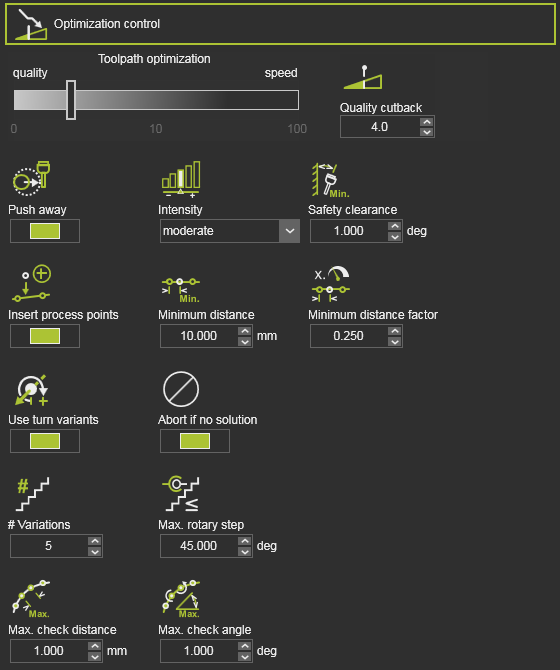
Heuristic parameter to balance between best result and fastest computation time.
|
The value can be interpreted as cost tolerance per meter toolpath.
A value of 0 would result in the global best result, i.e. lowest costs, regardless the required computation time.
A value of 1 would mean that even a toolpath having higher costs up to 1 per meter in average would be acceptable as optimization result, though there would be better results with lower total costs.
|
|
|
|
In the standard optimization process, each toolpath position is analyzed against the collision tolerance that has been set in the simulation settings. When the initial toolpath position has collisions, the optimization tends to find a solution very close to this collision (or collision tolerance), to minimize the costs impact. With the following attributes an additional collision free requirement can be defined.
|
|

|
Push away
|
Activates an additional optimization criterion with the goal to increase the distance between possible colliding objects.
|
|
|

|
Intensity
|
The strength of the repulsion effect.
|
Depending on the cost of other target criteria, a certain degree of strength can have different visible impacts.
|
|

|
Safety clearance
|
The minimum angular distance from collision to be maintained if possible.
|
If the safety distance cannot be maintained, solutions closer to the collision are also selected.
A default value of 1 deg. has been set.
|
Expert
|
|
|

|
Max. # variations
|
Divides the range in a maximum number of variations, i.e. step size.
|
|
Expert
|

|
Max. rotary step
|
The maximum allowed rotation step per variation of the robot / machine axis.
|
|
Expert
|

|
Abort if no solution
|
Terminates the optimization.
|
To prevent unnecessary long computation times, the optimization process will be aborted when on the first iteration step no solution has been found.
|
Expert
|
|
|
If the resource has limited rotary axis, closed contour geometry can lead to unwind situations depending on start point and process direction.
|
|

|
Use turn variants
|
Prevent unwind situations by selecting proper turn values for the first process point.
|
Limited to one turn value below and one above the default turn value.
Turn variants will be not considered, if the turn value is already set for the first process point.
|
Expert
|
|
|
The automatic toolpath optimization builds an optimized toolpath based on the incident validation at the toolpath positions and the via points on circular toolpath sections. It cannot prevent that in between these toolpath positions the trajectory still encounters some incident issue, because the trajectory itself cannot be evaluated.
With using the motion check of the data of the toolpath, the algorithm can define intermediate points between the toolpath positions and evaluate them for incidents. The quality evaluation on these intermediate points restricts for incidents on collision, reachability and singularity.
|
|

|
Max. distance
|
The maximum Cartesian distance between two consecutive points to be checked.
|
|
Expert
|

|
Max. angle
|
The maximum angular 'distance' between two consecutive points to be checked.
|
|
Expert
|
|
|
Toolpath quality is measured in costs. Incidents on toolpath positions, or between the positions normally increase these costs. The automatic optimization can identify the area of impact of these incidents. By trying to limit such area, the costs will reduce.
This can be achieved by adding, inserting additional process points on the toolpath around these critical areas.
|
|

|
Insert process points
|
Switch to enable to insert additional process points.
|
|
|

|
Minimum distance
|
The minimum Cartesian distance between two process points.
|
Measured between two inserted process points or between the inserted process point and an existing one.
|
Expert
|

|
Minimum distance factor
|
The minimum distance as factor of the local process speed.
|
Measured between two inserted process points or between the inserted process point and an existing one.
|
Expert
|

|
The inserted process points belong to the automatic optimization data. This means that when running another optimization, removing the optimization data or anything else that causes a recomputation of the initial toolpath, these inserted process points will be deleted.
|
|
|